
Troubleshooting The Oracle Touch BES990 After a Failed Descale
Sean GIf your Oracle Touch has no steam after descale, your BES990 is not heating after descale, or the machine behaves like it has a blocked or damaged boiler circuit, this guide explains the likely fault chain and the checks to do before running another descale.
The Hidden Dangers of Descaling the Breville BES990
The Breville BES990 Oracle Touch is especially sensitive during descaling because the steam boiler relies on water level probes and firmware thresholds to decide when to refill and when it is safe to heat. On older version 2 steam boilers, a small amount of steam, moisture, or descale residue on a probe can be enough for the machine to misread the boiler level.
This is why some owners see Oracle Touch no steam after descale, BES990 not heating after descale, or a machine that appears to be stuck after the descale cycle. In the worst cases, the machine can heat when the steam boiler is not properly filled, which can blow the thermal fuse or damage the boiler.
Important: the checks below are written for the Oracle Touch BES990. Do not use this exact process on the Dual Boiler, non-touch Oracle, or other models, because their menus and safe test procedure differ. Only continue if you are comfortable working around hot water, steam, and the possibility that the machine may need the top cover removed to recover it.
How the BES990 Steam Boiler Probes Work
The steam boiler uses metal probes to measure whether water has reached specific levels inside the boiler. In simple terms:
- High probe / red wire: controls the steam boiler fill pump. If this probe falsely reads as wet, the machine may think the boiler is full and stop refilling.
- Low probe / blue wire: is tied to heater permission. If this probe falsely reads as wet when the boiler is actually low or empty, the heater can be allowed to run when it should not.
The probes work by measuring conductivity through the water. Descale solution is more conductive than plain water, so contamination can make a probe appear submerged even when the water level is actually below it.
Why the BES990 Threshold Is So Unforgiving
The BES990 identifies water presence at a more sensitive point than some other dual boiler models. Older notes often describe this as a resistance threshold around 1.3 megaohms, compared with around 0.8 megaohms on some other models. In the Oracle Touch debug menu, the easier number to watch is the probe AD count.
- Below about 1880 AD count: the machine treats the probe as submerged in water.
- Around 2800 AD count: water has not reached the probe.
- Above about 2300 AD count after draining: generally a healthier dry-probe reading.
- Below about 2300 AD count after draining: the probe is becoming borderline, and descale solution may push it into a false wet reading.
During testing with Breville's own descale solution at the recommended dose, a probe reading can shift by roughly 500 AD counts. That means a reading that looks merely borderline with water can become unsafe once descale solution is added. As a practical rule, you want dry-probe readings closer to 2500 or higher before feeling confident about running a descale.
How to Check Probe Readings Before Descaling
Let the machine reach full steam-boiler temperature before doing this test. Use a towel across the drip tray area, because hot steam and water can escape from the descale drain. If anything feels wrong, close the drain screw and stop.
- Switch the machine off at the wall.
- Hold the machine power button while switching the wall power back on.
- Keep holding until the password screen appears.
- Enter 00000.
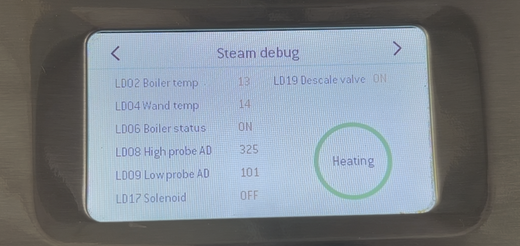
- Choose Debug Menu, then scroll to the steam boiler debug page.
- Watch the high and low probe AD count values.
First, confirm the steam pump can refill the boiler:
- Remove the descale drain cover.
- Slowly open the right-side descale drain screw anticlockwise until steam or water begins to release.
- Drain for about 5 seconds, then close the screw.
- You should hear the pump refill the lost water. If it completes in roughly 5 to 10 seconds, the pump is responding and you can continue.
Next, test the probes:
- Drain again for about 5 seconds and watch the high probe AD count. It should jump upward, ideally toward 2800. If it stays below about 2300, stop the test and do not descale.
- If the high probe looks healthy, continue draining until the low probe AD count also rises. Again, if it stays below about 2300, close the drain screw immediately and do not descale.
- If both probes rise cleanly, the machine has a better chance of completing a descale, especially if you use the correct product and dose.
A failed example would be a high probe that only rises to around 1400 after draining. That is below the wet threshold, so the machine may still think the boiler is full and refuse to refill correctly.
Which Descale Product Should You Use?
For this model, use Breville's own descale solution at the stated dose. Do not overdose. Stronger citric-acid mixes or improvised solutions can make the conductivity problem worse and reduce the already-small safety margin around the probe readings.
The Consequences of Probe Contamination
When descale solution residue affects the probes, one of two main failures can occur:
- Red / high probe contamination: the machine may falsely register the boiler as full, so the steam pump does not refill when it should. The boiler may stay empty or low, and the machine may refuse to heat.
- Blue / low probe contamination: the machine may allow the heater to run when the boiler is not properly filled. This is the dangerous failure mode because it can overheat the boiler, blow the thermal fuse, damage the element, or require a boiler repair.
How to Protect Your Machine
- Use a professional descaling service if you are uncertain about the test or not comfortable recovering the machine if it fails.
- Replace the steam probes periodically. On older BES990 machines, replacing the probes every couple of years can reduce the risk of false readings. Brand new probes still have their protective coating and generally sense water more reliably during descale. Breville Steam Probes
- Avoid overdosing descale solution. More product is not safer. It can make the probe readings less reliable.
- Check the probe AD counts first. If either probe cannot rise above about 2300 when drained, treat the machine as high risk.
- Use this supporting video to assess the condition of your machine before carrying out a descale: Will Your Oracle Touch Survive a Descale?
If Your Machine Is Already Stuck After Descale
Enter the debug menu and look at the high and low probe AD counts. If the high probe is hovering below the dry range, the probe may be contaminated with descale solution or may be faulty. If the low probe is also affected, the risk of boiler overheating or thermal fuse failure is higher.
If there is clean water in the boiler, you may be able to rinse contamination off the probe without opening the machine:
- Remove the water tank and any loose parts.
- Tilt the machine forward about 45 degrees.
- Gently rock or shake the machine if you can do so safely.
- Re-check the probe AD counts in debug mode.
If that does not recover the readings, the top cover may need to come off so the affected probe can be removed and rinsed manually. Allow the machine to cool for at least 15 to 20 minutes first. The red wire goes to the high probe and the blue wire goes to the low probe. Remove the connector and retaining clip, pull the probe out, rinse it in fresh water, then refit it. Moving the O-ring part way down the ceramic shaft can make refitting easier.
If the machine still will not recover after the probes are cleaned, the boiler thermal fuse, heating element, or control board may already be damaged.
Do I Have the Older Version Machine?
From what I have seen, Breville changed to the newer steam boiler design around the middle of 2022, but this is not a guarantee. Some machines appear to have later dates depending on colour, region, or production batch.
There are a couple of ways to check:
- Enter the Service Mode menu and open System Info. If you have version 1.6, there is a good chance you have the newer version, although this is still something I am collecting evidence on. Here is the service-mode guide: How to Enter the Service Mode on the Oracle Touch BES990
- Remove the top lid and inspect the steam boiler probes. The older version has water level probes held in with clips. The newer version has compression fitting nuts on the probes.
Conclusion
Pre-2023 Breville BES990 Oracle Touch machines need caution during descaling. The combination of old-design water level sensors, conductive descale solution, and a high detection threshold can leave very little margin for error. The most useful pre-descale check is the debug-menu AD count: if either probe cannot rise cleanly above about 2300 when drained, avoid descaling until the probe issue is fixed.
If your machine has already stopped heating, lost steam, or suffered an overheat event after a descale, the most common next-step parts are the Steam Boiler Repair Kit and, where triac faults are involved, the Oracle Triac Board Service Kit.
To further assist you, I have created a flowchart that allows you to troubleshoot common issues related to descaling and water level sensors (click to open in new tab):
